
Vulnerability Management Lifecycle: 6 Steps to a Working Program
The vulnerability management lifecycle step by step: asset inventory, scanning cadence, prioritization, remediation SLAs, verification, metrics and reporting.
By NetGuardUpdated: 7 min readنسخه فارسی
The vulnerability management lifecycle is the continuous process of finding, prioritizing, fixing and verifying security weaknesses across all of your assets. It usually has six stages: discover, assess, prioritize, remediate, verify and report. Unlike a one-off scan or an annual audit, it runs as a loop, because new assets, new CVEs and new configuration changes appear every week.
A working program matters because scanning alone does not reduce risk; closing findings does. Many organizations own a scanner but still carry the same critical issues for months, because nobody owns the assets, priorities are unclear or fixes are never verified. This guide walks through each stage, with practical SLAs, the metrics that matter and the pitfalls to avoid.
The six stages of the vulnerability management lifecycle
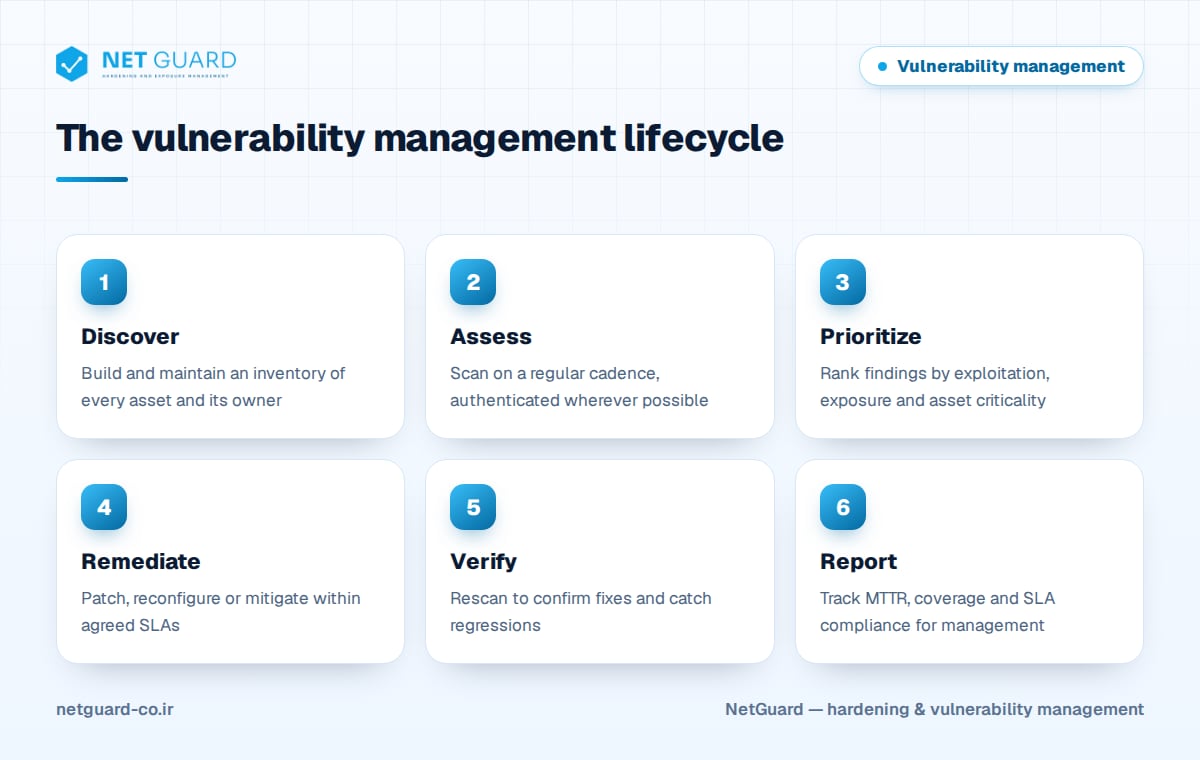
Each stage feeds the next. Weak asset discovery means blind spots in scanning; weak prioritization means the team wastes effort; no verification means you report fixes that never happened. Standards reflect this: ISO/IEC 27001:2022 control 8.8 (management of technical vulnerabilities) expects a defined process, and PCI DSS v4.0.1 sets specific scan and patch requirements. See our compliance overview for how these map together.
Stage 1: Asset inventory
You cannot protect what you do not know about. Build an inventory that includes:
- Servers, endpoints, network devices, databases, cloud resources and containers
- Internet-facing domains, subdomains, IP ranges and certificates
- Operating system and software versions, so CVEs can be matched accurately
- An owner for every asset, who is accountable for fixing its findings
- A criticality tier (for example Tier 1 for crown-jewel and internet-facing systems)
Reconcile the inventory regularly against network discovery scans, cloud accounts and your CMDB. Assets that appear in scans but not in the inventory are a finding in themselves.
Stage 2: Assessment and scanning cadence
Choose a cadence based on exposure and change rate, not on what is convenient:
- Internet-facing assets: continuous or at least weekly external scanning.
- Internal servers and endpoints: authenticated scans weekly to monthly.
- After significant changes: scan new systems before they go live and after major upgrades.
- Emergency scans: when a critical, actively exploited CVE is published, scan for it immediately instead of waiting for the next cycle.
- Configuration audits: check hardening baselines such as CIS Benchmarks alongside CVE scanning, since misconfigurations have no CVE.
Compliance sets a minimum, not a target: PCI DSS requirement 11.3.1 calls for internal vulnerability scans at least once every three months, and 11.3.2 for external scans by an Approved Scanning Vendor every three months. Prefer authenticated scanning wherever possible; it sees installed packages and settings and produces far fewer false positives. Our vulnerability scanner guide explains how to choose and tune a scanner, and vulnerability assessment vs penetration testing explains where manual testing fits.
Stage 3: Prioritization
Sorting by CVSS alone creates an unmanageable queue. Rank findings using exploitation evidence (CISA KEV, EPSS, public exploits), exposure and asset criticality, as described in CVSS vs EPSS vs KEV. The output of this stage should be a short list per asset owner with a clear priority on each item.
Stage 4: Remediation and SLAs
Remediation is not only patching. Options include applying a vendor patch, changing a configuration, removing an unused service or package, adding a compensating control such as segmentation or a WAF rule, or decommissioning the asset. Coordinate patch rollouts with your patch management process.
Define remediation SLAs per priority, agree them with IT and business owners, and start the clock when the finding is first detected. The table below is an example; adjust it to your risk appetite and regulatory obligations.
| Priority | Typical criteria | Example SLA |
|---|---|---|
| P1 | In KEV, or exploit available on a Tier 1 or internet-facing asset | 7 days |
| P2 | Critical or High with exploitation signal, or Critical on Tier 1 | 30 days |
| P3 | Remaining High and Critical findings | 90 days |
| P4 | Medium and Low findings | Next maintenance cycle, or 180 days |
Check these against your obligations: for example, PCI DSS requirement 6.3.3 expects critical security patches to be installed within one month of release.
Exceptions and risk acceptance
Some findings cannot be fixed on time: a legacy system has no patch, or a fix would break a critical application. Handle these through a formal exception process, not silent delay:
- The asset owner documents the reason and the business impact of fixing it.
- Compensating controls are described and, where possible, verified.
- The risk owner, not the IT team, approves the acceptance.
- Every exception gets an expiry date, typically 90 days or less, and is reviewed before renewal.
- Exceptions are reported to management as an open-risk count.
Stage 5: Verification
A ticket marked "done" is not proof. Rescan the affected assets after remediation and close the finding only when the scan confirms it. Verification also catches regressions: a restored backup, a rebuilt VM from an old image or a configuration drift can reintroduce a vulnerability you fixed months ago. Track reopened findings separately; a high reopen rate points to process problems such as outdated golden images.
Stage 6: Metrics and reporting to management
Measure the program, not just the number of findings:
- MTTR (mean time to remediate): average days from detection to verified fix, tracked per priority.
- Scan coverage: percentage of inventoried assets scanned, and authenticated, within the target cadence.
- SLA compliance: percentage of findings fixed within their SLA, and the number currently overdue.
- Vulnerability age: how long the oldest open P1 and P2 findings have been open.
- KEV exposure: count of open KEV vulnerabilities on your assets; the target is zero.
- Exceptions: number of active risk acceptances and how many are past expiry.
Management needs trends and risk, not raw counts. A one-page monthly report should show SLA compliance and MTTR over time, open critical risk by business unit, coverage gaps and the exceptions waiting for a decision. Technical teams need the detailed, per-asset list.
Common pitfalls
- Scanning without an owner for each asset, so findings have no one to go to
- Treating every High and Critical as equally urgent
- Unauthenticated scans only, leading to false positives and missed issues
- Closing tickets without rescanning
- Exceptions without expiry dates that quietly become permanent
- Reporting "number of vulnerabilities found" as a success metric
- Ignoring configuration weaknesses because they have no CVE
How NetGuard helps
NetGuard supports every stage of the lifecycle on one platform: external attack surface discovery and asset inventory, authenticated and agentless scanning of servers, network devices, endpoints, databases, web applications and cloud resources, CIS-based hardening audits with drift detection, and risk-based prioritization using known-exploited vulnerabilities, public exploits and asset criticality. Rescans verify fixes, findings map to ISO 27001, PCI DSS and NIST, and reports for executives and engineers are available in Persian and English. Contact us to plan a pilot.
Frequently asked questions
What is vulnerability management?
Vulnerability management is the ongoing process of identifying assets, scanning them for security weaknesses, prioritizing findings by risk, remediating them within agreed timeframes, verifying the fixes and reporting progress. It differs from a one-time vulnerability assessment because it runs continuously and is measured with metrics such as MTTR, scan coverage and SLA compliance.
What are the steps of the vulnerability management lifecycle?
The vulnerability management lifecycle has six common steps: discover assets, assess them with vulnerability scans and configuration audits, prioritize findings by exploitation evidence and asset criticality, remediate within SLAs, verify fixes with rescans, and report metrics to management. Some frameworks name the steps differently, but the loop and its goals are the same.
How often should vulnerability scans be run?
Internet-facing systems should be scanned continuously or at least weekly, and internal systems weekly to monthly with authenticated scans. Also scan after major changes and whenever a critical, actively exploited vulnerability is announced. PCI DSS requires internal and external scans at least every three months, but that is a minimum, not a best practice.
What is a good MTTR for vulnerabilities?
There is no universal number; a good MTTR is one that consistently meets your own SLAs for each priority level. Track MTTR separately for P1 and lower priorities, because a single average hides slow fixes on critical issues. The trend matters most: MTTR for known-exploited and internet-facing vulnerabilities should fall over time.
What is a vulnerability management SLA?
A vulnerability management SLA is the agreed maximum time to remediate a finding, based on its priority. For example, an organization might set 7 days for known-exploited vulnerabilities on critical assets and 30 days for other high-risk findings. SLAs should be approved by management, measured from first detection and backed by a formal exception process.
- #vulnerability management lifecycle
- #vulnerability management program
- #remediation SLA
- #vulnerability scanning cadence
- #risk acceptance
- #MTTR