
Patch Management Process: Steps, SLAs and Best Practices
A practical patch management process: asset inventory, KEV and EPSS prioritization, testing, deployment rings, emergency patching, SLAs and best practices.
By NetGuardUpdated: 8 min readنسخه فارسی
Patch management is the disciplined process of identifying, prioritizing, testing, deploying and verifying security updates for operating systems, applications, network devices and firmware. Its goal is simple: close known vulnerabilities before attackers use them, without breaking the services the business depends on.
Many successful breaches start with vulnerabilities whose patches were released long before. The problem is rarely a missing patch; it is a missing process. The organization does not know what it owns, which patches are urgent, or whether a patch really landed. This guide walks through a complete patch management process, risk-based prioritization, legacy systems and a sample SLA table, with the best practices that make it work.
The patch management process in six steps
Patch management is a subset of the vulnerability management lifecycle and should run as a continuous cycle, not a once-a-year project.
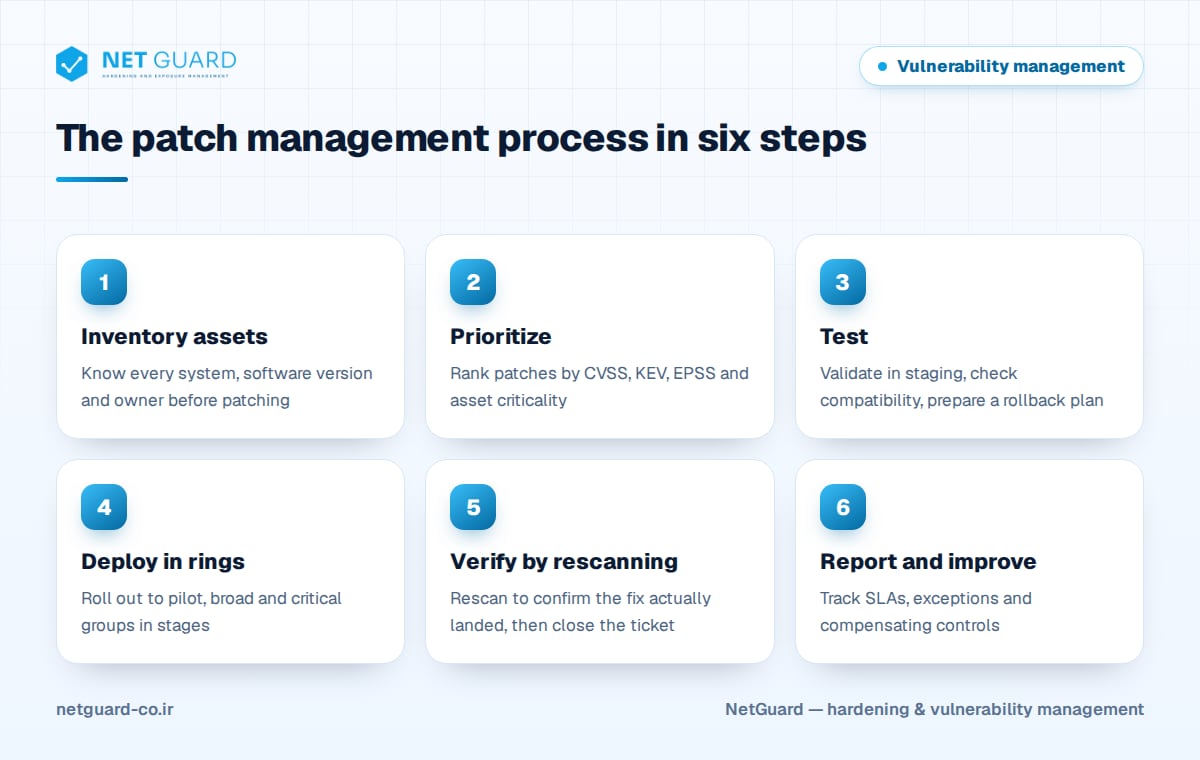
- Inventory assets: you cannot patch what you do not know exists.
- Monitor and prioritize: track vendor advisories and rank patches by risk.
- Test: install in a staging environment and check compatibility with business applications.
- Deploy in rings: roll out gradually to defined groups, with the ability to pause and roll back.
- Verify: rescan to confirm the patch is installed and effective.
- Report and improve: track metrics and exceptions and remove recurring blockers.
Asset inventory and prioritization with KEV and EPSS
Inventory: the starting point
For every system, the inventory should record at least the exact operating system and version, installed software, technical and business owner, criticality, whether it is internet-facing and its approved maintenance window. Forgotten assets, such as abandoned test servers, old network gear and user-installed software, are usually the ones that never get patched. Regular discovery scans are the best way to find them.
Prioritizing patches
Hundreds of patches are released every month, and installing them all with the same urgency is neither possible nor necessary. Prioritizing on CVSS alone buries teams under a pile of "critical" items. A risk-based approach combines:
- CVSS: the technical severity; a starting point, not the final decision.
- CISA KEV catalog: vulnerabilities known to be exploited in the wild. A CVE in KEV means real, immediate risk.
- EPSS: FIRST's model estimating the probability of exploitation in the next 30 days, useful for ordering large backlogs.
- Asset criticality and exposure: a medium-severity flaw on an internet-facing server can be more urgent than a critical one on an isolated system.
See CVSS, EPSS and KEV explained for a deeper look at these signals.
Testing and deployment rings
Testing before rollout
Staging should mirror production as closely as possible. Before deployment, confirm the patch installs cleanly, the system reboots, key applications work and a rollback plan (snapshot or backup) exists. Testing must not become an excuse for long delays; for high-risk patches, a few days is enough.
Deployment rings
Instead of patching everything at once, deploy in rings:
- Ring 0: IT team systems and the test environment.
- Pilot ring: a small group of users and servers that represents the diversity of the estate.
- Broad ring: most workstations and non-critical servers.
- Critical ring: key servers and services, inside agreed maintenance windows.
If a ring shows problems, pause and investigate before continuing. Microsoft releases its monthly security updates on the second Tuesday of each month (Patch Tuesday), and many organizations align their ring schedule with that calendar.
Patch management tools
- Windows: WSUS (Microsoft has stopped developing new features for it), Microsoft Configuration Manager, and Intune with Windows Autopatch.
- Linux: Red Hat Satellite, Canonical Landscape, and automatic update services such as unattended-upgrades and dnf-automatic.
- Cross-platform: automation tools such as Ansible to apply updates consistently across mixed server fleets.
To check update status on a single server quickly:
# Debian/Ubuntu: list upgradable packages
sudo apt update && apt list --upgradable
# Debian/Ubuntu: is a reboot required?
[ -f /var/run/reboot-required ] && cat /var/run/reboot-required
# RHEL/Rocky/AlmaLinux: list and install security updates only
sudo dnf updateinfo list --security
sudo dnf upgrade --security
# RHEL/Rocky/AlmaLinux: is a reboot required?
sudo dnf needs-restarting -r
# Windows: most recently installed updates
Get-HotFix | Sort-Object InstalledOn -Descending | Select-Object -First 10 HotFixID, Description, InstalledOn
Emergency patching
When a vulnerability is added to KEV, has a public exploit or threatens internet-facing systems, the monthly cycle is too slow. Define an emergency procedure in advance:
- Set clear triggers, for example a KEV entry affecting an internet-facing asset.
- Have a fast emergency change approval with a minimal set of decision makers.
- If no patch exists yet, apply the vendor's workaround: disable the vulnerable feature, restrict access or add a WAF or IPS rule.
- Keep testing short but do not skip it, and patch internet-facing assets first.
- After patching, look for signs of earlier compromise; a patch prevents the next attack but does not undo one that already happened.
Legacy and unpatchable systems
Some systems cannot be patched: end-of-support operating systems, industrial equipment, medical devices or software whose vendor no longer exists. They need compensating controls:
- Network segmentation: isolate the system and allow only the minimum required traffic.
- Virtual patching: use a WAF or IPS to block known exploitation patterns.
- Attack surface reduction: disable unnecessary services and protocols and apply configuration hardening.
- Application allowlisting: allow only approved software to run.
- Enhanced monitoring: log and review events on these systems more closely.
- Formal exceptions: risk acceptance signed by the business owner, with an expiry date and a replacement plan.
Verification by rescanning and patch SLAs
A "success" status in the deployment console does not mean the vulnerability is gone. A required reboot may be pending, an old copy of a library may remain elsewhere on disk, or the fix may also need a configuration change. The only reliable proof is a rescan with a vulnerability scanner, closing tickets based on scan results.
Define remediation SLAs by risk. The table below is an example to adapt to your own requirements:
| Category | Example criterion | Suggested remediation time |
|---|---|---|
| Emergency | In KEV or actively exploited, on an internet-facing asset | 24 to 72 hours, or immediate mitigation |
| Critical | CVSS 9.0 to 10.0, or in KEV on an internal asset | 7 to 14 days |
| High | CVSS 7.0 to 8.9 | Up to 30 days |
| Medium | CVSS 4.0 to 6.9 | 60 to 90 days |
| Low | CVSS 0.1 to 3.9 | Normal maintenance cycle |
If you are in scope for PCI DSS, requirement 6.3.3 expects critical security patches to be installed within one month of release. Useful metrics include SLA compliance rate, mean time to remediate, number of active exceptions and the number of assets missing from recent scans.
How NetGuard helps
NetGuard uses authenticated and agentless scanning to find missing patches on servers, endpoints, network devices and databases, and prioritizes them using known-exploited vulnerabilities, public exploits and asset criticality. Rescans verify that fixes actually landed, configuration drift detection flags unwanted changes, and Persian and English reports make remediation progress visible to managers and auditors. See the vulnerability scanner page for details.
Frequently asked questions
What is patch management?
Patch management is the structured process of identifying, prioritizing, testing, deploying and verifying software and security updates across all IT assets. Its purpose is to close known vulnerabilities before attackers exploit them, keep services stable and provide auditors with reliable evidence. It is one part of a broader vulnerability management program that also covers configuration weaknesses and risk acceptance.
Which patches should be installed first?
Start with vulnerabilities that are known to be exploited (listed in the CISA KEV catalog) or have public exploits, especially on internet-facing and critical assets. Then use CVSS severity and EPSS exploitation probability to order the rest. Relying on CVSS alone usually produces a large pile of "critical" items that all look equally urgent, which slows remediation down.
How often should servers receive security updates?
Most organizations run a regular monthly cycle aligned with Microsoft's and other vendors' monthly releases. Alongside it, an emergency procedure is needed for actively exploited vulnerabilities, completed within days or even hours. Remediation deadlines should be written down as SLAs based on severity and asset criticality, and tracked as metrics.
What should you do with systems that cannot be patched?
Apply compensating controls: network segmentation, restricted access, disabling unnecessary services, virtual patching with a WAF or IPS, application allowlisting and enhanced monitoring. The residual risk should be formally accepted by the business owner, the exception should have an expiry date, and there should be a plan to replace or upgrade the system.
How do you verify that a patch actually worked?
A success message from the deployment tool is not enough, because a reboot may be pending or a vulnerable copy may remain elsewhere. The best practice is an authenticated rescan after deployment and closing tickets only on scan results. This also produces reliable evidence for ISO 27001 and PCI DSS audits.
- #patch management process
- #patch management best practices
- #patch management
- #security updates
- #patch prioritization
- #patch SLA