
Network Device Hardening: Cisco Router, Switch and Firewall Guide
Network device hardening for Cisco routers, switches and firewalls: SSH and AAA, CoPP, routing authentication, SNMPv3, NTP, logging and rule reviews.
By NetGuardUpdated: 7 min readنسخه فارسی
Network device hardening means configuring routers, switches and firewalls so that only authorized administrators can manage them, routing cannot be hijacked or overloaded, and traffic passing through them is filtered and logged. A default configuration is built to work out of the box, not to resist attack: Telnet, HTTP management, SNMP community strings and unused ports are common leftovers.
Network devices are attractive targets because they see all traffic, rarely run endpoint security tools and often go years without firmware updates. This guide organizes hardening by the three planes of a device, with Cisco IOS and IOS XE examples you can adapt. Command syntax can vary by platform and release, so test changes in a lab first.
The three planes of network device hardening
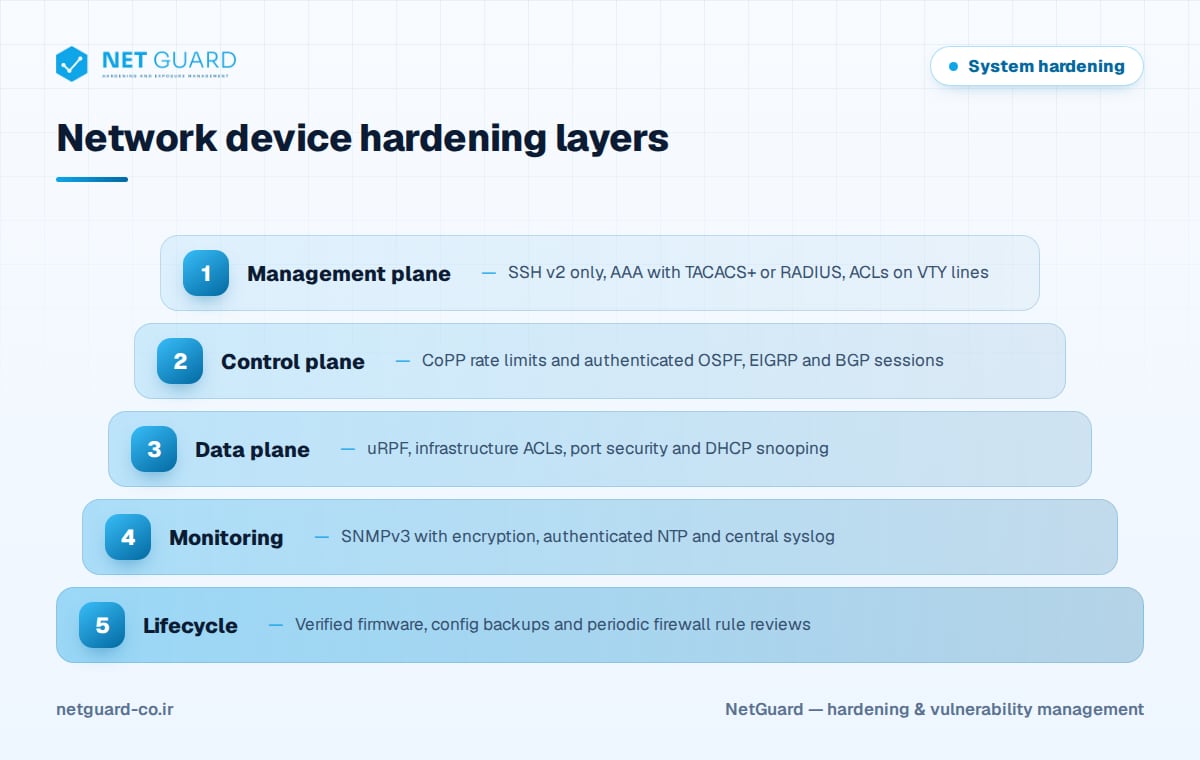
Every router or switch has three functional planes, and each needs its own controls.
| Plane | What it does | Key hardening controls |
|---|---|---|
| Management plane | Administrator access: CLI, SNMP, APIs | SSH v2, AAA, VTY ACLs, no Telnet/HTTP |
| Control plane | Routing protocols, ARP, spanning tree | CoPP, routing protocol authentication |
| Data plane | Forwarding user traffic | ACLs, uRPF, port security, DHCP snooping |
Management plane: SSH, AAA and access control
SSH v2 only, no Telnet or HTTP
Generate an RSA key, force SSH version 2, disable the HTTP servers and limit VTY lines to a management subnet.
hostname EDGE-R1
ip domain name corp.example
crypto key generate rsa modulus 2048
ip ssh version 2
ip ssh time-out 60
ip ssh authentication-retries 3
no ip http server
no ip http secure-server
no service pad
security passwords min-length 12
login block-for 120 attempts 5 within 60
username netadmin privilege 15 algorithm-type scrypt secret <strong-password>
!
ip access-list standard MGMT-HOSTS
 permit 10.10.50.0 0.0.0.255
 deny any log
!
line vty 0 15
 access-class MGMT-HOSTS in
 transport input ssh
 exec-timeout 10 0
Use algorithm-type scrypt (type 9) for local secrets. service password-encryption only applies weak type 7 obfuscation, so never rely on it.
Centralized AAA with TACACS+ or RADIUS
Central authentication gives individual accounts, command authorization and an audit trail. Keep a local fallback account for when the server is unreachable.
aaa new-model
tacacs server TACACS-1
 address ipv4 10.10.50.10
 key <shared-secret>
aaa group server tacacs+ TACACS-GRP
 server name TACACS-1
aaa authentication login default group TACACS-GRP local
aaa authorization exec default group TACACS-GRP local
aaa accounting commands 15 default start-stop group TACACS-GRP
Control plane protection
Control Plane Policing (CoPP)
The route processor is a shared resource. A flood of SSH, SNMP or ICMP packets aimed at the device can starve routing protocols and drop the network. CoPP applies a QoS policy to traffic destined to the device: permit and rate-limit management and routing traffic from known sources, and police everything else. Many modern platforms, such as Catalyst 9000 switches, ship with a default CoPP policy that you should review rather than disable.
Authenticate routing protocols
Unauthenticated OSPF, EIGRP or BGP sessions let an attacker inject routes. Use authentication with strong keys, and protect BGP with the TTL security check and prefix limits.
interface GigabitEthernet0/1
 ip ospf authentication message-digest
 ip ospf message-digest-key 1 md5 <ospf-key>
!
router bgp 65010
 neighbor 192.0.2.1 remote-as 65020
 neighbor 192.0.2.1 password <bgp-key>
 neighbor 192.0.2.1 ttl-security hops 1
 neighbor 192.0.2.1 maximum-prefix 1000
Newer releases support SHA-based OSPF authentication through key chains; prefer it where available.
Data plane and switch port security
On routers, filter spoofed traffic and disable features that leak information:
- Apply infrastructure ACLs that block traffic to device addresses from untrusted networks.
- Enable unicast RPF (
ip verify unicast source reachable-via rx) on edge interfaces. - Disable
ip redirects,ip unreachablesandip proxy-arpon external interfaces. - Turn off CDP and LLDP on interfaces facing untrusted networks.
On access switches, most attacks start at an unused or poorly configured port:
ip dhcp snooping
ip dhcp snooping vlan 10,20
ip arp inspection vlan 10,20
!
interface range GigabitEthernet1/0/1 - 24
 switchport mode access
 switchport access vlan 10
 switchport port-security
 switchport port-security maximum 2
 spanning-tree portfast
 spanning-tree bpduguard enable
!
interface range GigabitEthernet1/0/25 - 47
 description UNUSED
 switchport mode access
 switchport access vlan 999
 shutdown
!
interface GigabitEthernet1/0/48
 description UPLINK
 ip dhcp snooping trust
 ip arp inspection trust
Hosts with static IP addresses need ARP ACLs before dynamic ARP inspection is enforced. Also avoid VLAN 1 for user traffic, change the native VLAN on trunks and disable DTP with switchport nonegotiate on trunks.
SNMPv3, NTP and logging
Remove all SNMPv1/v2c community strings and use SNMPv3 with authentication and encryption (priv). Accurate, authenticated time is essential for correlating logs, and logs must leave the device.
ip access-list standard SNMP-HOSTS
 permit 10.10.50.0 0.0.0.255
snmp-server view NMS-VIEW iso included
snmp-server group NMS-RO v3 priv read NMS-VIEW access SNMP-HOSTS
snmp-server user nms-user NMS-RO v3 auth sha <auth-pass> priv aes 128 <priv-pass>
!
ntp authentication-key 1 md5 <ntp-key>
ntp authenticate
ntp trusted-key 1
ntp server 10.10.50.5 key 1
!
service timestamps log datetime msec localtime show-timezone
logging buffered 64000 informational
logging host 10.10.50.20
login on-failure log
archive
 log config
  logging enable
  hidekeys
The archive log config section records every configuration command, which is invaluable during an investigation.
Firmware, backups and firewall rule review
Firmware and configuration backups
Track vendor security advisories and include network devices in your patch management process. Verify image hashes (verify /md5 flash:IMAGE.bin, or SHA-512 where supported) against the vendor's published values, and replace end-of-support hardware. Back up configurations automatically after every change, store them encrypted because they contain secrets, and compare versions to spot unauthorized edits.
Firewall rule review
Firewalls degrade as rules accumulate. Review the rule base on a fixed schedule:
- Export the rule base with hit counters.
- Remove
any-anyrules and narrow overly broad sources, destinations and ports. - Find shadowed and duplicate rules.
- Disable rules with no hits over a defined period after confirming with the owner.
- Require an owner, justification, ticket and review date for every rule.
- End with an explicit deny rule that logs.
- Restrict management interfaces to a dedicated management network and require MFA.
Configuration guides such as the CIS Benchmarks for Cisco IOS and major firewalls turn these practices into testable checks, and our system hardening guide covers the broader program.
How NetGuard helps with network device hardening
NetGuard performs authenticated and unauthenticated vulnerability scans of routers, switches and firewalls, matching firmware versions to known CVEs and prioritizing them by exploit intelligence and asset criticality. Configuration audits compare device settings against CIS Benchmarks and your own baselines, and drift detection shows when a change reintroduces Telnet, weak SNMP or an open management interface. External attack surface discovery reveals management ports exposed to the internet, and rescans verify fixes. See our hardening audit capabilities or contact us.
Frequently asked questions
What is network device hardening?
Network device hardening is the process of securing routers, switches and firewalls by disabling insecure services, restricting management access, authenticating routing protocols, encrypting monitoring traffic and keeping firmware current. It covers the management, control and data planes of each device, plus processes such as configuration backups and periodic firewall rule reviews.
How do I disable Telnet on a Cisco router?
Under the VTY lines, set transport input ssh so only SSH is accepted, and make sure SSH version 2 is enabled with ip ssh version 2 and an RSA key of at least 2048 bits. Apply an access-class ACL to the VTY lines so that only the management subnet can connect, and verify with show ip ssh and show line vty 0 4.
Why use SNMPv3 instead of SNMPv2c?
SNMPv2c sends community strings in clear text, and a read-write community gives full control of the device. SNMPv3 adds per-user authentication and encryption when configured with the priv security level. Combine it with a restricted view and an ACL that limits which management stations can query the device.
What is Control Plane Policing (CoPP)?
CoPP is a QoS policy applied to traffic destined to the device itself rather than traffic passing through it. It rate-limits or drops packets such as SSH, SNMP, ICMP and routing protocol traffic by source and type, protecting the CPU from floods so that routing and management stay available during an attack.
How often should firewall rules be reviewed?
Set a fixed review cycle in your security policy, at least every six months for most organizations, and also after major network changes. Some standards, such as PCI DSS, require periodic reviews of network security control configurations. Each review should remove unused and overly permissive rules and confirm every rule still has an owner and justification.
- #network device hardening
- #Cisco IOS hardening
- #router hardening
- #switch security
- #firewall hardening
- #SNMPv3 configuration