
What Are CIS Benchmarks? A Practical Guide to CIS Hardening
What are CIS Benchmarks and how do you use them? Level 1 vs Level 2, automated vs manual checks, CIS Controls, STIG comparison and a CIS hardening plan.
By NetGuardUpdated: 7 min readنسخه فارسی
CIS Benchmarks are consensus-based secure configuration guides published by the Center for Internet Security (CIS). Each benchmark targets one specific product, such as Windows Server 2022, Ubuntu 24.04, SQL Server or Kubernetes, and contains hundreds of precise recommendations: which setting, which value, why, and how to audit and apply it. So if you are asking "what are CIS Benchmarks", the short answer is: the most widely used public reference for turning default settings into a hardened, auditable configuration.
They matter because they answer the question "what exactly does secure mean?" with concrete, testable settings. Frameworks such as PCI DSS and ISO 27001 require secure configurations but do not list registry keys or sysctl values. CIS Benchmarks are the list auditors and engineers point to.
What are CIS Benchmarks and what do they cover?
CIS is a nonprofit, and its benchmarks are developed through a consensus process: volunteers and subject matter experts in the CIS WorkBench community draft, discuss and approve recommendations, and new versions follow new product releases. PDF versions of most benchmarks are free for non-commercial use from the CIS website.
There are more than a hundred benchmarks covering almost every layer:
- Operating systems: Windows Server and Windows clients, Linux distributions such as Ubuntu, RHEL and Debian, and macOS
- Servers and middleware: IIS, Apache HTTP Server, NGINX and Tomcat
- Databases: Microsoft SQL Server, Oracle Database, PostgreSQL and MySQL
- Network devices: Cisco, Palo Alto, Fortinet and Juniper products
- Cloud and containers: AWS, Azure, Google Cloud, Docker and Kubernetes
- Applications: web browsers and Microsoft 365
Anatomy of a recommendation
Every recommendation follows the same structure: profile applicability, description, rationale, impact, audit procedure, remediation procedure, default value, references and a mapping to CIS Controls. The impact section is the one operations teams should read first, because it tells you what a setting may break.
CIS Benchmark Level 1 vs Level 2
Each recommendation belongs to one or more profiles. The two core profiles are:
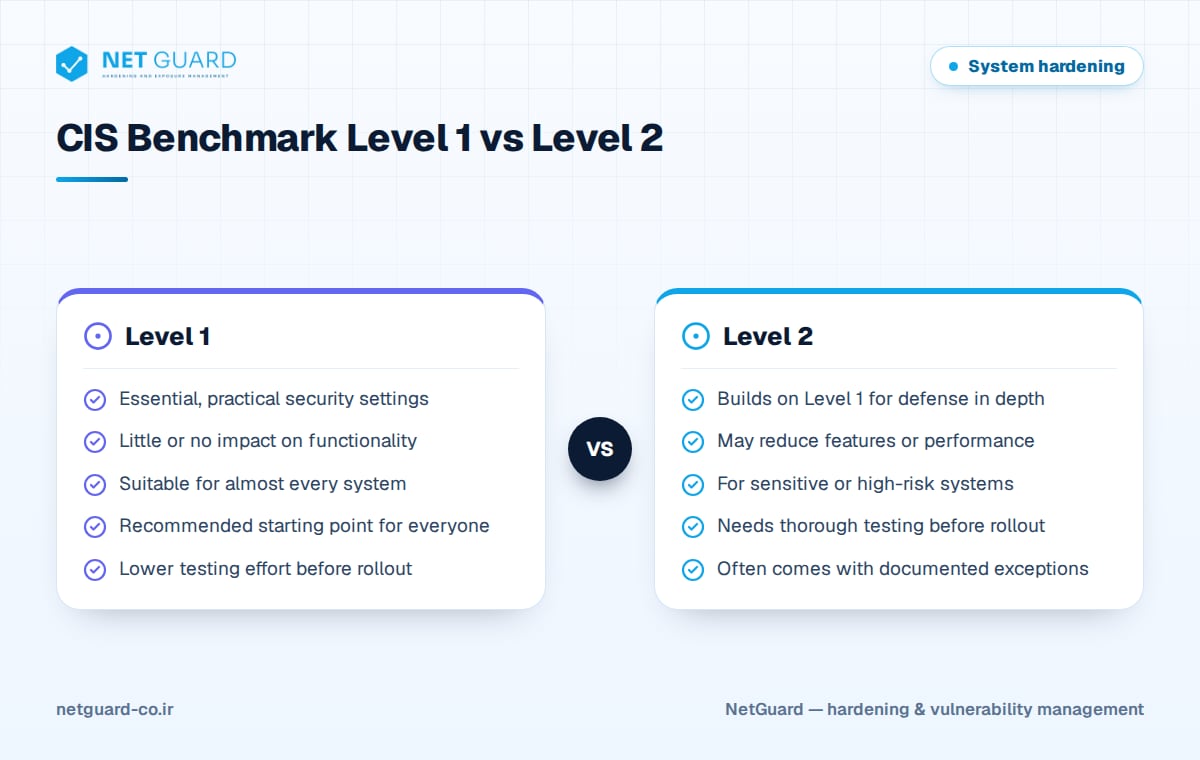
- Level 1: essential, practical settings that noticeably raise security and are not expected to significantly hurt functionality or usability. Nearly every organization should target this level.
- Level 2: everything in Level 1 plus stricter settings for defense in depth. It is intended for environments where security outweighs convenience and may reduce some features or performance.
Some benchmarks add further profiles. Windows benchmarks, for example, separate Domain Controller and Member Server profiles and include optional profiles such as BitLocker and Next Generation Windows Security. Some Linux benchmarks also include a STIG profile aligned with DISA requirements.
Automated vs manual (formerly scored vs not scored)
Older benchmark versions labeled recommendations Scored or Not Scored: failing a scored recommendation lowered the overall score, while a not scored one did not. Newer versions use Automated and Manual instead:
| Label | Meaning | Example |
|---|---|---|
| Automated | Can be fully checked by a tool with a pass/fail result | Minimum password length is 14 or more characters |
| Manual | Needs human judgment or information outside the system | Package manager repositories are correctly configured |
Practical tip: do not ignore manual recommendations. Tools will not score them, but they are still part of CIS hardening and belong in your periodic review checklist.
CIS Controls vs CIS Benchmarks
The two are often confused, but they work at different levels. The CIS Controls are a prioritized set of program-level safeguards; version 8.1, released in 2024, has 18 controls grouped into three Implementation Groups (IG1, IG2 and IG3). CIS Benchmarks are configuration guides for a specific product.
Put simply, the Controls tell you what to do and the Benchmarks tell you exactly how to do it on a given product. Control 4, Secure Configuration of Enterprise Assets and Software, requires secure configurations, and the benchmarks are the practical way to meet it. Each benchmark recommendation is mapped back to the relevant Controls.
CIS Benchmarks vs DISA STIGs
Security Technical Implementation Guides (STIGs) are configuration standards from the US Defense Information Systems Agency (DISA) and are mandatory for Department of Defense systems.
| Aspect | CIS Benchmark | DISA STIG |
|---|---|---|
| Publisher | CIS, a nonprofit | DISA, US Department of Defense |
| Development | Community consensus | Government-authored for defense needs |
| Levels | Level 1 and Level 2 profiles | Severity CAT I, CAT II, CAT III |
| Strictness | Balanced and tailorable | Usually stricter |
| Typical users | Private and public sector worldwide | Defense agencies and contractors |
For most commercial organizations, CIS Benchmarks are the more practical choice; STIGs are a useful secondary reference for very sensitive systems.
How to implement CIS hardening step by step
- Pick the right benchmark: the benchmark version must match your product version; a Windows Server 2019 benchmark is not enough for 2022.
- Choose the profile: decide per asset group whether Level 1 is enough or Level 2 is needed, and set the role, such as Domain Controller or Member Server.
- Run a gap assessment: use a configuration audit tool such as CIS-CAT or a CIS-compatible scanner to measure the current state and record the compliance percentage.
- Prioritize: fix high-risk, low-impact items first, such as disabling SMBv1 or direct root login over SSH.
- Apply in a controlled way: use GPO, Ansible or scripts, first in a lab and then in waves. CIS SecureSuite members also get ready-made GPO build kits.
- Record exceptions: every recommendation you do not apply needs a reason, owner, compensating control and review date.
- Audit continuously: schedule scans, track configuration drift and update your baseline when a new benchmark version is released.
For hands-on settings, see our Windows Server hardening checklist and Linux server hardening checklist. If you are new to the topic, start with what is system hardening.
Managing exceptions
Reaching 100% compliance is neither always possible nor always necessary. A legacy application may still need TLS 1.0, or a Level 2 setting may conflict with a critical system. What auditors and security teams expect is a managed exception:
- A clear technical or business reason
- A named owner who accepts the risk
- A compensating control, such as network restriction or extra monitoring
- An expiry or review date
- The exception recorded in your audit tool, so reports show it as accepted rather than failed
This approach also fits the documented configuration management required by control 8.9 in ISO 27001.
How NetGuard helps with CIS hardening
NetGuard audits Windows and Linux servers, databases and network devices against CIS Benchmarks and your own custom baselines, shows the compliance percentage per asset and detects configuration drift between scans. CIS and CVE content is updated regularly, findings map to ISO 27001, PCI DSS and NIST, and both executive and technical reports are available in English and Persian. See the NetGuard hardening audit page for details.
Frequently asked questions
What are CIS Benchmarks?
CIS Benchmarks are secure configuration guides for specific products, published by the Center for Internet Security through a consensus process. Each benchmark lists recommendations with a description, rationale, audit procedure and remediation steps, organized into Level 1 and Level 2 profiles. Organizations use them as a hardening baseline and as a reference point for security compliance audits.
Are CIS Benchmarks free?
PDF versions of most CIS Benchmarks are free for non-commercial use after registering on the CIS website. Tools such as CIS-CAT Pro, ready-made GPO build kits and machine-readable formats are part of the paid CIS SecureSuite membership. Third-party configuration audit tools can also assess compliance with CIS Benchmarks without requiring that membership.
Should I choose Level 1 or Level 2?
Level 1 is the right starting point for most servers because it raises security significantly and rarely causes operational problems. Level 2 suits sensitive systems such as domain controllers, payment servers or critical infrastructure, but it must be tested carefully before rollout and will probably need a few documented exceptions to keep applications working.
What is the difference between CIS Controls and CIS Benchmarks?
The CIS Controls are a framework of 18 prioritized, program-level safeguards implemented through Implementation Groups IG1 to IG3. CIS Benchmarks are technical configuration guides for individual products. The Controls say what to do, for example securely configure enterprise assets, and the Benchmarks show exactly how to do it on Windows, Linux, a database or a cloud account.
How do I audit CIS compliance?
Use a configuration audit tool that supports the benchmark for your exact product version, such as CIS-CAT or a CIS-compatible scanner, and run authenticated checks against your systems. The output is a compliance percentage and a list of failed recommendations. Repeat audits on a schedule, record accepted exceptions, and review manual recommendations by hand.
- #what are CIS Benchmarks
- #CIS hardening
- #CIS Benchmark Level 1
- #CIS Level 2
- #CIS Controls vs Benchmarks
- #CIS vs STIG
- #secure configuration baseline