
Docker and Kubernetes Hardening: A Container Security Guide
Docker and Kubernetes hardening guide: minimal images, non-root containers, Pod Security Standards, RBAC, NetworkPolicies, secrets and CIS benchmarks.
By NetGuardUpdated: 7 min readنسخه فارسی
Docker and Kubernetes hardening means securing every layer of a container platform: the images you build, the hosts and runtime that run them, the Kubernetes control plane, the workloads themselves, and the network and secrets that connect them. Containers are not a security boundary by default; a container running as root with extra capabilities, or a pod that can talk to every other pod, gives an attacker a short path from one bug to the whole cluster.
Kubernetes ships with flexible defaults rather than strict ones. Pods can run as root, every pod can reach every other pod, and Secrets are only base64-encoded unless you enable encryption. This guide walks through the controls that close those gaps, aligned with the CIS Docker and CIS Kubernetes Benchmarks and the Kubernetes Pod Security Standards.
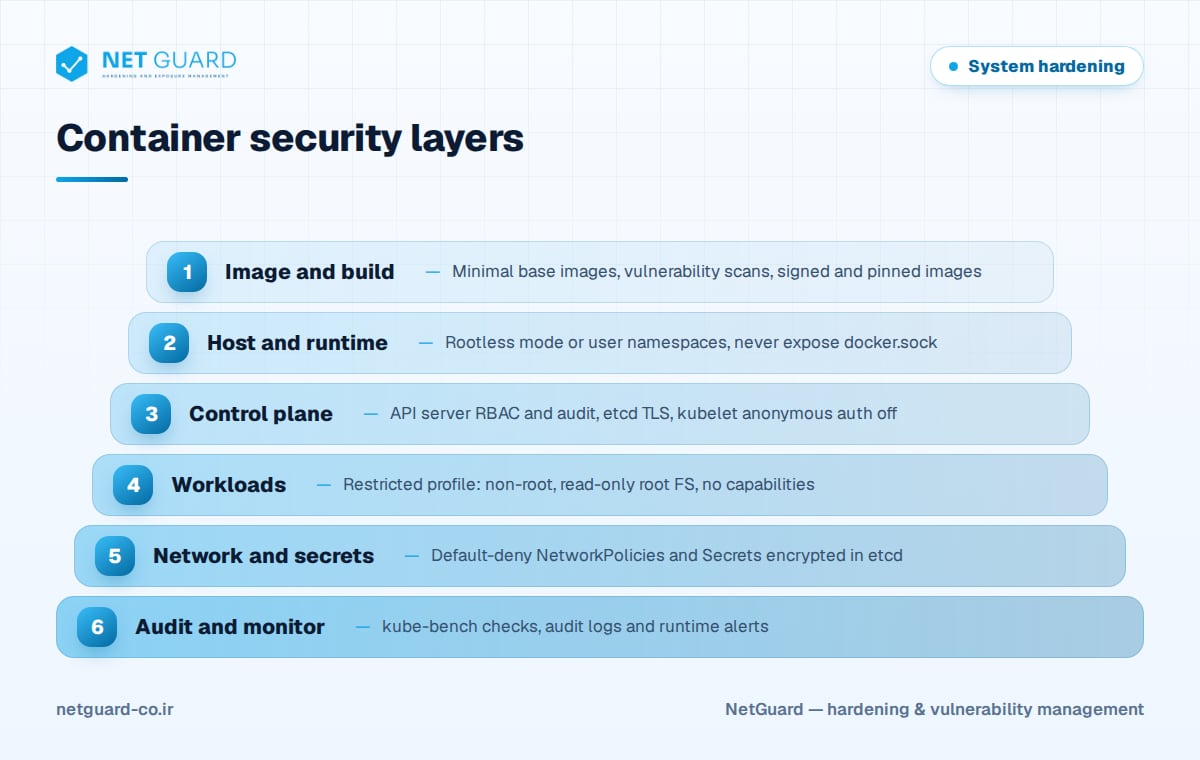
Docker and Kubernetes hardening in layers
Container security works best as defense in depth. Each layer limits what an attacker can do if the layer above fails.
| Layer | Typical risk | Key controls |
|---|---|---|
| Image | Known CVEs, bloated base images, embedded secrets | Minimal bases, scanning, pinned digests, signing |
| Host and runtime | Container escape, exposed Docker socket | Patched kernel, rootless mode, no privileged containers |
| Control plane | Anonymous API access, unencrypted etcd | RBAC, audit logging, TLS, encryption at rest |
| Workload | Root processes, writable filesystems | Pod Security Standards, securityContext |
| Network | Lateral movement between pods | Default-deny NetworkPolicies |
Secure container images
Every package in an image is potential attack surface. Use multi-stage builds so compilers and build tools never reach production, and start from minimal or distroless base images.
FROM golang:1.22 AS build
WORKDIR /src
COPY . .
RUN CGO_ENABLED=0 go build -o /out/app ./cmd/app

FROM gcr.io/distroless/static-debian12:nonroot
COPY --from=build /out/app /app
USER nonroot:nonroot
ENTRYPOINT ["/app"]
- Scan images in CI and fail the build on high and critical findings, for example with
trivy image --severity HIGH,CRITICAL --exit-code 1 registry.example.com/web:1.4.2. - Rescan images already in registries; new CVEs are published every day.
- Pin images by digest in production manifests rather than mutable tags such as
latest. - Sign images and verify signatures at admission time.
- Never bake passwords, tokens or keys into image layers.
Harden the Docker host and runtime
The container host is shared by every container on it, so its hardening matters as much as the containers. Follow our Linux server hardening guide for the base OS, then apply runtime restrictions:
docker run -d --name web \
  --read-only --tmpfs /tmp \
  --user 10001:10001 \
  --cap-drop ALL --cap-add NET_BIND_SERVICE \
  --security-opt no-new-privileges:true \
  --pids-limit 200 --memory 512m --cpus 1 \
  registry.example.com/web:1.4.2
- Never run containers with
--privilegedor with host namespaces unless there is no alternative. - Never mount
/var/run/docker.sockinto a container; it grants root on the host. - Do not expose the Docker daemon on TCP without mutual TLS.
- Consider rootless mode or
userns-remapso container root is not host root. - Keep the default seccomp and AppArmor or SELinux profiles enabled.
Pod Security Standards and securityContext
Kubernetes defines three Pod Security Standards: privileged (unrestricted), baseline (blocks known privilege escalations such as privileged containers, host namespaces and hostPath volumes) and restricted (adds non-root, dropped capabilities and seccomp requirements). The built-in Pod Security Admission controller, which replaced PodSecurityPolicy, enforces them per namespace with labels:
apiVersion: v1
kind: Namespace
metadata:
  name: payments
  labels:
    pod-security.kubernetes.io/enforce: restricted
    pod-security.kubernetes.io/warn: restricted
    pod-security.kubernetes.io/audit: restricted
A pod that satisfies the restricted profile looks like this:
apiVersion: v1
kind: Pod
metadata:
  name: web
  namespace: payments
spec:
  automountServiceAccountToken: false
  securityContext:
    runAsNonRoot: true
    runAsUser: 10001
    seccompProfile:
      type: RuntimeDefault
  containers:
    - name: web
      image: registry.example.com/web:1.4.2
      securityContext:
        allowPrivilegeEscalation: false
        readOnlyRootFilesystem: true
        capabilities:
          drop: ["ALL"]
      resources:
        limits:
          cpu: "500m"
          memory: "512Mi"
Start new namespaces at restricted, and use baseline only where a workload genuinely cannot comply yet.
RBAC, NetworkPolicies and secrets
Least-privilege RBAC
Bind Roles to specific namespaces instead of using ClusterRoles where possible. Avoid wildcards, keep cluster-admin bindings to a minimum, and treat permissions such as reading Secrets, pods/exec, escalate, bind and impersonate as highly privileged. Check what an identity can do with kubectl auth can-i --list --as=system:serviceaccount:payments:ci-bot -n payments.
Default-deny NetworkPolicies
Without policies, every pod can reach every other pod. Apply a default-deny policy per namespace, then allow only required flows. Your CNI plugin must support NetworkPolicy, and egress rules must explicitly allow DNS.
apiVersion: networking.k8s.io/v1
kind: NetworkPolicy
metadata:
  name: default-deny-all
  namespace: payments
spec:
  podSelector: {}
  policyTypes:
    - Ingress
    - Egress
Secrets
Kubernetes Secrets are base64-encoded, not encrypted. Enable encryption at rest on the API server with --encryption-provider-config, preferably using a KMS v2 provider, restrict RBAC access to Secrets, and consider an external secrets manager for high-value credentials.
Control plane, kubelet and CIS benchmark auditing
On self-managed clusters you control these settings directly; on managed services, check the provider-specific CIS benchmark for what remains your responsibility.
| Component | Setting | Purpose |
|---|---|---|
| kube-apiserver | --anonymous-auth=false |
Reject unauthenticated requests |
| kube-apiserver | --authorization-mode=Node,RBAC |
Enforce RBAC and node authorization |
| kube-apiserver | --audit-policy-file, --audit-log-path |
Record API activity |
| kube-apiserver | --profiling=false |
Disable profiling endpoints |
| etcd | --client-cert-auth=true, --peer-client-cert-auth=true |
Require TLS client certificates |
| kubelet | authentication.anonymous.enabled: false |
No anonymous kubelet API access |
| kubelet | authorization.mode: Webhook, readOnlyPort: 0 |
Authorize requests, close the read-only port |
Audit regularly rather than once:
- Run kube-bench on control plane and worker nodes to test against the CIS Kubernetes Benchmark.
- Run Docker Bench for Security on standalone Docker hosts.
- Scan running images and cluster configuration for new vulnerabilities and misconfigurations.
- Fix findings, re-run the checks and record exceptions with an owner and review date.
How NetGuard helps with container security
NetGuard scans container images for known vulnerabilities and checks Kubernetes configuration for risky settings such as privileged pods, missing security contexts and overly broad access. Host and node configurations are audited against CIS Benchmarks, drift detection reveals changes that weaken a hardened baseline, and findings are prioritized by exploit intelligence and asset criticality, with rescans to verify fixes. Read more about our hardening audits or contact us.
Frequently asked questions
What is the CIS Kubernetes Benchmark?
The CIS Kubernetes Benchmark is a consensus configuration guide from the Center for Internet Security that lists recommended settings for the API server, controller manager, scheduler, etcd, kubelet and policies such as RBAC and pod security. Each recommendation includes an audit and remediation procedure. Tools such as kube-bench automate many of its checks.
What is the difference between baseline and restricted Pod Security Standards?
Baseline prevents known privilege escalations: privileged containers, host namespaces, hostPath volumes and added dangerous capabilities. Restricted includes everything in baseline and also requires running as non-root, disallowing privilege escalation, dropping all capabilities and setting a seccomp profile. Restricted is recommended for most application workloads.
Should containers run as root?
No. A process running as root inside a container is much closer to root on the host if a container escape vulnerability or misconfiguration exists. Set a non-root user in the image, enforce runAsNonRoot in Kubernetes, drop all capabilities and disable privilege escalation. Most applications run as non-root without changes.
Are Kubernetes Secrets encrypted?
Not by default. Secrets are stored base64-encoded in etcd, which anyone with etcd or backup access can decode. Enable encryption at rest with an encryption configuration on the API server, ideally backed by a KMS provider, limit RBAC access to Secrets and protect etcd with TLS and restricted network access.
How do I audit a Kubernetes cluster for security?
Run kube-bench to compare nodes and control plane settings with the CIS Kubernetes Benchmark, review RBAC bindings and NetworkPolicies, and scan running images for vulnerabilities. Check Pod Security Admission labels on every namespace and review API audit logs. Repeat the audit regularly, since cluster configuration and images change constantly.
- #Docker and Kubernetes hardening
- #container security
- #Kubernetes security best practices
- #Pod Security Standards
- #CIS Kubernetes Benchmark
- #Docker hardening