
Active Directory Hardening: A Practical Security Checklist
Active Directory hardening guide: tiered admin model, privileged groups, LAPS, Kerberos and NTLM controls, LDAP signing, auditing and DC security.
By NetGuardUpdated: 8 min readنسخه فارسی
Active Directory hardening is the work of shrinking the attack surface of your AD forest: limiting who holds privileged access, retiring legacy authentication protocols, fixing weak Kerberos settings and making sure every sensitive change is logged. Because AD authenticates almost every Windows server, workstation and many business applications, one compromised Domain Admin account usually means the whole network is compromised.
Most real-world AD breaches do not need a zero-day. Attackers chain ordinary weaknesses: a service account with a weak password and an SPN, one local administrator password on hundreds of machines, an admin signing in to an infected workstation, or NTLM accepted everywhere. This guide covers the controls that break those chains, roughly in the order to apply them.
The tiered administration model
Domain controllers hold the password hashes of every account, so hardening individual servers, as in our Windows Server hardening guide, is not enough on its own. The tier model separates administrative control into zones so that credentials from a high-value zone are never exposed on a lower-value system. Microsoft has folded it into its broader Enterprise Access Model, but tiers remain the most practical starting point for on-premises AD.
| Tier | What it contains | Who administers it |
|---|---|---|
| Tier 0 | Domain controllers, AD itself, PKI/AD CS, ADFS, Entra Connect, and the virtualization, backup and management systems that control them | Dedicated Tier 0 admin accounts from privileged access workstations |
| Tier 1 | Member servers, databases, line-of-business applications | Separate Tier 1 server admin accounts |
| Tier 2 | Workstations, laptops, user devices | Help desk and desktop admin accounts |
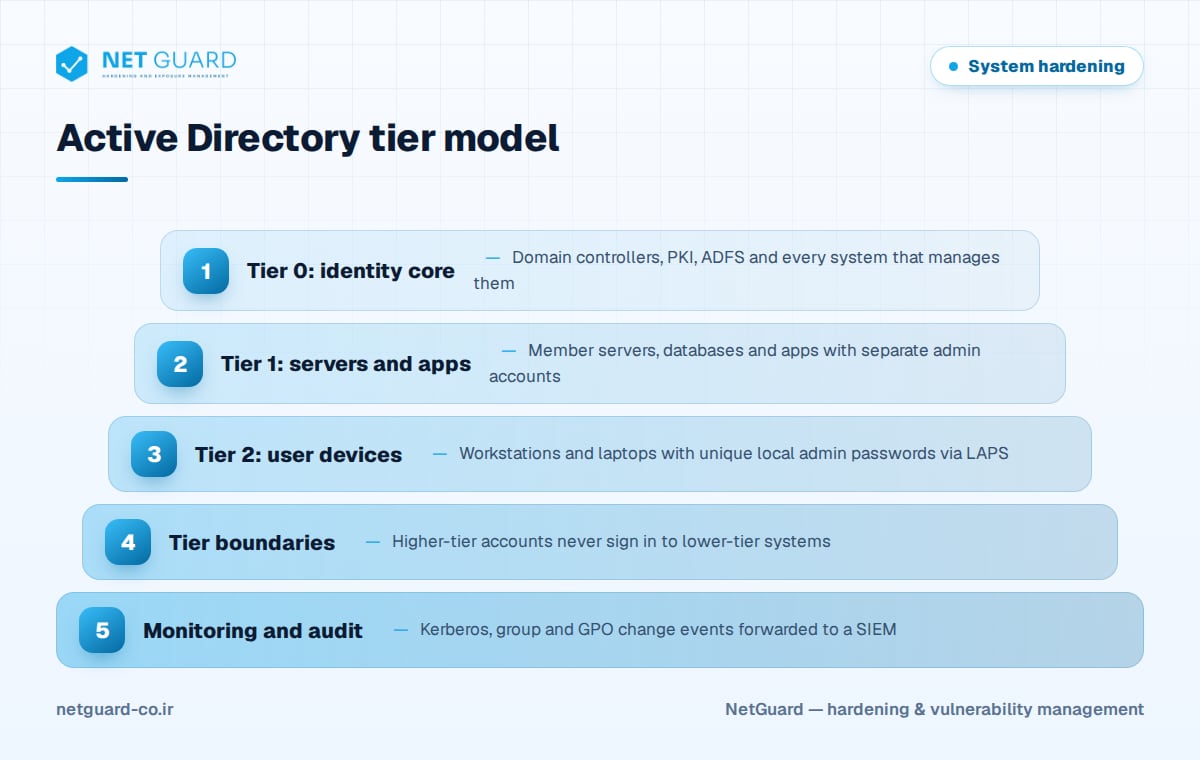
Give each administrator a separate account per tier, and use user rights such as "Deny log on locally" and "Deny log on through Remote Desktop Services" so Tier 0 accounts cannot sign in to lower-tier machines. Authentication policies and silos can enforce the same boundary in Kerberos.
Lock down privileged groups
Inventory every direct and nested member of Domain Admins, Enterprise Admins, Schema Admins, Administrators, the built-in Operators groups, DnsAdmins and Group Policy Creator Owners.
- Keep Enterprise Admins and Schema Admins empty and add members only for a planned change.
- Leave Account Operators, Server Operators, Print Operators and Backup Operators empty; by default they can sign in to domain controllers.
- Mark every admin account as "Account is sensitive and cannot be delegated".
- Find computers other than DCs that are trusted for unconstrained delegation and remove that setting.
- Set
ms-DS-MachineAccountQuotato 0 so ordinary users cannot join computers to the domain. - Review ACLs on sensitive objects; tools such as PingCastle and BloodHound reveal hidden attack paths.
The Protected Users group
Members of Protected Users cannot use NTLM or DES/RC4 Kerberos pre-authentication, cannot be delegated and get no cached credentials. Their TGTs last four hours without renewal. Add human admin accounts after testing, never service or computer accounts.
Local administrator passwords with Windows LAPS
A shared local admin password lets an attacker move from one workstation to all of them. Windows LAPS, built into current Windows versions, rotates a unique password per machine and stores it in AD (optionally encrypted) or Microsoft Entra ID.
# Extend the AD schema for Windows LAPS (once per forest)
Update-LapsADSchema
# Allow computers in an OU to write their own LAPS password
Set-LapsADComputerSelfPermission -Identity "OU=Servers,DC=corp,DC=example"
# Check who can read passwords, then retrieve one as an authorized admin
Find-LapsADExtendedRights -Identity "OU=Servers,DC=corp,DC=example"
Get-LapsADPassword -Identity "SRV-APP01" -AsPlainText
Kerberos hardening
Rotate the krbtgt password
The krbtgt account signs every Kerberos ticket; if its hash is stolen, attackers can forge "golden tickets". Reset it twice, waiting for replication and at least the maximum ticket lifetime (10 hours by default) between resets. Do this periodically and always after a suspected compromise.
Prefer AES and retire RC4
Once no legacy system needs RC4, set "Network security: Configure encryption types allowed for Kerberos" to AES128_HMAC_SHA1, AES256_HMAC_SHA1 and Future encryption types. Check msDS-SupportedEncryptionTypes on service accounts and reset very old passwords so AES keys exist.
Mitigate Kerberoasting and AS-REP roasting
Kerberoasting requests service tickets for user accounts with SPNs and cracks them offline. AS-REP roasting does the same for accounts that do not require Kerberos pre-authentication.
# User accounts with SPNs (Kerberoasting candidates)
Get-ADUser -Filter 'ServicePrincipalName -like "*"' -Properties ServicePrincipalName, PasswordLastSet |
  Select-Object SamAccountName, PasswordLastSet, ServicePrincipalName
# Accounts without Kerberos pre-authentication (AS-REP roasting)
Get-ADUser -Filter 'DoesNotRequirePreAuth -eq $true' | Select-Object SamAccountName
Move services to group Managed Service Accounts (gMSA), whose long random passwords rotate automatically. Otherwise use 25+ character random passwords, enforce AES, remove SPNs from privileged accounts and re-enable pre-authentication.
Restrict NTLM and secure LDAP
NTLM enables relay and pass-the-hash attacks, and unsigned LDAP lets attackers tamper with directory traffic. Audit first, then enforce.
| Group Policy setting | Recommended value |
|---|---|
| Network security: LAN Manager authentication level | Send NTLMv2 response only. Refuse LM & NTLM |
| Network security: Do not store LAN Manager hash value on next password change | Enabled |
| Network security: Restrict NTLM: Audit NTLM authentication in this domain | Enable all (before blocking) |
| Domain controller: LDAP server signing requirements | Require signing |
| Domain controller: LDAP server channel binding token requirements | When supported, then Always |
| Network security: LDAP client signing requirements | Negotiate signing or higher |
| Microsoft network server: Digitally sign communications (always) | Enabled |
Before enforcing, use the NTLM operational log and Directory Service events 2887 and 2889 to find clients still using NTLM or unsigned LDAP binds.
Group Policy hygiene and auditing
Clean up Group Policy
GPOs are powerful and often neglected. Remove passwords stored in Group Policy Preferences (the old cpassword issue), delete unlinked or empty GPOs, and restrict who can edit GPOs linked to the Domain Controllers OU or the domain root. Keep the Default Domain Policy for account and password settings only, and document the purpose and owner of every other GPO. A recognized baseline such as the CIS Benchmarks or the Microsoft security baselines gives you a tested starting point.
Audit and monitor sensitive changes
Enable Advanced Audit Policy on DCs for Kerberos Authentication Service, Kerberos Service Ticket Operations, Credential Validation, Security Group Management, User Account Management and Directory Service Changes. Forward these events to a SIEM and alert on:
- 4728, 4732, 4756: member added to a security-enabled group, especially privileged ones
- 4769 with RC4 encryption (type 0x17): possible Kerberoasting
- 4768 without pre-authentication and 4771 bursts: roasting or password spraying
- 5136: directory object changed, including GPO modifications
- 4794: attempt to set the DSRM password; 1102: audit log cleared
Domain controller hardening checklist
- Run DCs as dedicated servers with only AD DS and DNS; prefer Server Core.
- Treat hypervisors, storage and backup systems hosting DCs as Tier 0.
- Disable the Print Spooler service on domain controllers.
- Block internet browsing and unnecessary outbound traffic from DCs.
- Patch DCs on a priority schedule and apply a hardened baseline.
- Use Secure Boot and BitLocker for virtual and branch DCs; use RODCs where physical security is weak.
- Back up System State, test forest recovery, enable the AD Recycle Bin and protect the DSRM password.
See our system hardening guide for broader controls.
How NetGuard helps with Active Directory security
NetGuard runs authenticated scans of domain controllers and member servers to find missing patches and audits their configuration against CIS Benchmarks and your own baselines, including LAN Manager authentication level, LDAP signing and Kerberos encryption types. Drift detection flags when a GPO change weakens a hardened setting, findings are prioritized by exploit intelligence and asset criticality, and rescans verify fixes. Learn more about hardening audits or contact our team.
Frequently asked questions
What is the tiered admin model in Active Directory?
The tiered admin model splits administration into Tier 0 (domain controllers and identity systems), Tier 1 (servers and applications) and Tier 2 (user devices). Each administrator uses a separate account per tier, and higher-tier accounts never sign in to lower-tier systems, so a compromised workstation never exposes credentials that control the domain.
How often should the krbtgt password be reset?
Reset it according to a regular schedule set in your security policy, and always immediately after a suspected domain compromise. Each rotation consists of two resets, with full replication and at least the maximum ticket lifetime (10 hours by default) between them. Resetting twice too quickly can break authentication.
How do you prevent Kerberoasting?
Find user accounts with SPNs and move those services to group Managed Service Accounts, which use long random passwords that rotate automatically. For accounts that must stay, set passwords of 25 or more random characters, allow only AES encryption, and remove SPNs from privileged accounts. Alert on service ticket requests that use RC4 encryption.
What does the Protected Users group do?
Members of Protected Users cannot use NTLM, cannot use DES or RC4 for Kerberos pre-authentication, cannot be delegated and do not cache credentials for offline sign-in. Their Kerberos TGTs last four hours and cannot be renewed. Use it for human admin accounts, never for service or computer accounts.
Should I disable NTLM completely?
Disabling NTLM entirely is the goal, but do it gradually. First block LM and NTLMv1 with the LAN Manager authentication level setting, then enable NTLM auditing to find the applications and devices that still depend on it. Fix them, add unavoidable exceptions, then restrict NTLM domain-wide.
- #Active Directory hardening
- #AD security checklist
- #Kerberoasting mitigation
- #Windows LAPS
- #tiered admin model
- #krbtgt password reset